Showing posts with label BYOT. Show all posts

Monday, August 24, 2020

Actions of Classroom Teacher – Best Practices in In-Person and Online Learning

After experiences in summer school and now in our second week of the Fall semester, we are reflecting on what best practices *look* like in a totally new world of education.  So, taking traditional best practices, what does the look like for the hybrid, parallel instruction model?

*** Note: my school is at 50% capacity.  Students are split into two cohorts and attend class either in person or remotely.


Best Practice

What Might This Look Like?

Encourage student-faculty contact

·        Exchange contact information

·        Google Classroom “Question” assignment

·        Ensure students see your face regularly, even online, through regular check-in videos and virtual office hours

Develop reciprocity and cooperation among students

·        Create assignments where students F2F need the students online to complete the work as a strategy for keeping online students engaged

·        Group work – each member assigned a clear role and responsibility

·        Student(s) at home are group leader

·        Student in room is in charge of Chat and ensuring student(s) at home are included

·        Student at home leads discussion/game/activity in class

·        Students prepare questions prior to class, then work through them in groups during class

Use active learning techniques

·        Use synchronous time to maximize interaction between you and students and among students; if they can watch or consume content passively, try to assign it outside of synchronous instructional time

·        Create synchronous demonstrations that rely on participation of both F2F and online students

·        Start lessons with engagement strategies like KWL charts – what do I know, what I wonder, what I learned or Think-Pair-Share (at a social distance)

·        Look for opportunities for students to lead instruction or conversation

Establish clear routines that create predictability and support

·        Agendas

·        Class routines – every day, same routine

·        Incorporate visible thinking routines like graphic organizers, guided notes for each period (for ideas, see: https://pz.harvard.edu/thinking-routines)

Give prompt, constructive feedback

·        GClassroom rubrics are great for prompt, clear feedback

·        One on One workshop

·        Use audio and video feedback on written assignments

Emphasize time on task

·        Each assignment should have an “expected time to complete” that is shared with students

·        Consider modifying assignment if students report inability to complete/too fast to complete

Provide a balance of challenge and support

·        Offer challenge problems or situations (case studies, challenge practice problems, creation activities)

·        Scaffolded Kahoot!

·        Choice reading at various difficulty and interest levels

·        Links to more information on topics in GClassroom

Respect diverse talents and ways of learning

·        Choice assignments – either in content (reading or video) or product (written paper or podcast episode)

·        Incorporate technologies like Voicethread which encourage multi-modal engagement

Use deliberate practice and mastery learning strategies

·        Quick “Chat” check in for practice

·        Exit ticket for mastery check

·        Formative Assessments in blended manner – Classroom assignments, quiz assignment or question; EdPuzzle; electronic lab book (example in OneNote; example in GDoc)

Elicit active, critical reflection

·        Questions in GClassroom

·        Survey in GForms

·        Peer evaluation with rubrics

·        Peer evaluation of presentations or products

·        Writers workshops


 Best Practices above created by Chickering and Gamson (1987), Savory (2006), and McCullom (2010) as found in Evaluating Online Teaching (2015) by Tobin, Mandernauch, and Taylor.  Chapter 1 found https://media.wiley.com/product_data/excerpt/62/11189103/1118910362-4.pdf


Monday, May 2, 2016

Old School Discernment in the Digital Age

I get asked a lot about decision making in my job.  As an assistant principal, I can go from hiring to student conduct to event set up to state reports in a matter of 10 minutes.  While I am in no ways a perfect decision-maker, I have learned a few things over the years and most recently in Ignatian Leadership Seminars.  This post is built off a webinar I recent gave via the ISTE Connects Professional Learning Series (ISTE members can find the free webinar here – sorry about the pay wall folks). 

Old school discernment holds up quite well in the digital age.  While we may be making decisions about 1:1 programs, 3D printing, virtual reality or interactive screens, the process of decision-making via discernment holds.  As a Jesuit educator, discernment for me comes out of St. Ignatius’ Spiritual Exercises. The elements of Ignatian Discernment are:
  • A choice between two or more “goods” - discernment requires smart options 
  • The process is dynamic - discernment requires freedom of action and reflection
  • Feelings matter – trust those feelings of excitement, fear, calm, anxiety
So what does this look like in a 21st century example?  In 2009, the technology team at Brebeuf Jesuit began to discern what a 1:1 program at the school would look like.  Feel free to peruse old posts on this blog as to the details – but in a nutshell:

  • No matter what was chosen (Bring Your Own Technology, single-platform, continuation of carts) the priority was the student learning experience.  The choices could all work – and indeed had in many schools.
  • The discernment process ended up taking 2 years.  The time was filled with conversation, surveys, workshops and pilot programs.  At times, one option would outweigh another and the school created “what if we….” trials to see the real life experience of a choice.  Reflection allowed us to choose what was best for our students.
  • Oh the feelings – anxiety, resistance, enthusiasm, excitement were all handled respectfully.  The whys behind the feelings were considered. Many a digital aged initiative has failed because administration did not respect or address the feelings of those affected by the change.
So big picture discernment is about the choice between good choices, accepting a dynamic experience and attention to feelings.  What does the process look like in the details of digital age decision making? 


For me, the process looks something like this:

Phase One – Setting the Context
  • Identify the need to be addressed as concretely as possible
  • Gather all necessary information – data, interviews, sample products  
At this point, the team has a stated decision based on a need for change, choices between goods and is ready to move into an experiential phase. The catch here is detachment.  Change-makers must remain open to options and remain flexible at this phase.  Attaching oneself to any single choice will derail the process.

Phase Two – Experience
  • Evaluate advantages and disadvantages of choices – this may involve pilot programs, test groups, visiting another school. 
  • Test reasoning with self and others - now is the time to play with alternatives.  “What if we….”  “What would our school look like if….?”  If you have a school board or colleagues in the field, ask them to review your plan.
Again, remaining detached is key.  At this point, you may see “camps” in your decision-making team.  People start to become attached to a side and may stop listening.  The team leader should feel comfortable reminding the group to remain detached.

Phase Three – Deciding to Decide
  • Make a tentative decisions – For thee record not making a decision at this time is in fact a decision.  Maybe the context and experience phases have shown it’s not a good time to change.  That is an acceptable decision.  Some tentative decisions are easy – the best choice has made itself clear along the way.  Sometimes the tentative decision is fraught with anxiety.  Listen to that anxiety.
  • Live with the tentative decision for a set period of time.  This is the infamous “let’s sleep on it” stage.  What feeling arise in the decision?  If anxiety – why?  Are the reasons a deal breaker or feelings that can be lived with?  If excitement – why?  How does the team transfer that excitement to a larger group?
  • Finally, confirm the decision even if the team is not 100% on board.  Consensus is tricky business, but if the discernment process has been given time, consideration and detachment the group is ready to move.
Thankfully, good decisions show some signs along the way.  A good decision leads to movement.  When the team starts easily talking about next steps and the fun of the process, you are on the right track.  A sometimes difficult criterion in strong hierarchical groups is discernment made in freedom.  Good decisions happen outside of mandates, fear or reactive situations.  A good decision involves all affected by change.  All voices feel heard along the way, even if the decision was not made in their favor.  Finally, a good decision spirals a school to deeper knowledge.

For Brebeuf Jesuit, our 1:1 BYOT decision quickly engaged faculty and students in the possibilities it opened up.  Because 1:1 grew out of student and classroom needs, the ownership was in the hands of the learners, those who would use the technology day after day.  And over the years, this one decision has guided us in curriculum review, classroom redesign and new teaching practices.  We’ve learned a lot!  And grew as a learning community.

This is a rather long post so thanks for sticking with me!  More posts to come as I continue to gather ideas on pitfalls to avoid and conversation starters.  As always, comments welcome below!


Monday, January 19, 2015

The Teacher Resource Center (aka TRC)... Every School Should Have One

I was reminded this morning by the fabulous Nancy Caramanico that we talk a lot about our Teacher Resource Center (TRC) but have never really explained what it is and why it was created.  Well... nothing like a request :-)

I wish I could say that the idea of a playground for faculty (what we would call a MakerSpace in 2014) was all well thought out and planned.  But it wasn't.  The space was original made to house a special collection library from the Liberty Fund and function as a reading room for adults.  Admittedly, JD and I saw a bit broader application to the space - and we acted on it as soon as possible.  Of course, the Liberty Fund collection is still present in the room.

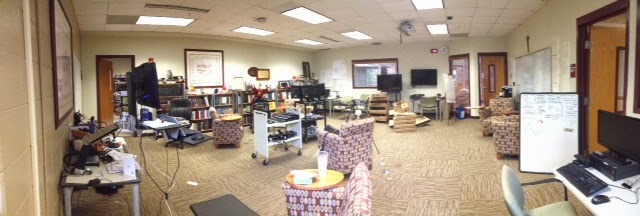
Panoramic shot of TRC during tech week
Purpose

In keeping with our Ignatian foundation, the TRC is a space for faculty and staff to experience and reflect on practices.  This can be as formal as an after school Ignatian Themes formation class or as informal as doughnut Thursdays.  The space is across the hall from the current library and will be remodeled as part of our Information Commons.  Visitors find comfortable/flexible furniture, web meeting software, a 3D printer,
complete set-up of classroom Extron system to experience and many print/electronic/human resources.  We also have a Keurig coffee maker and snacks (usually - Social Studies is quite the group of hunter/gathers and often clean us out).  Basically, anything a teacher would want to try before going into the classroom - we have the space to play.

Beyond space is the human relationship element.  In the picture above, you'll see three doors.  The door at 3:00 is my office.  While I moved into that office as Director of Faculty Development... I stayed when my responsibilities broadened out to Assistant Principal.  Why?  I like being close to the action of information services... I have more casual conversations about curriculum, technology integration and the values of DC over Marvel comics than I would if I had moved to the administrative suite.  For me, the relationships fostered by my location, and the ability to sit and have a cup of coffee with a colleague, trump anything else.

The door at 1:00 goes to the hall and the library.  The proximity to the library, and future integration into the Information Commons, highlights our resolve that learning, research and reflection is not just for students.  Students see adults engaged in new experiences, collaborating or working quietly... great modeling!

The door at 9:00 leads to IT offices.  Of course - you want to be close to the troubleshooters!   And yes, that is JD's mess about 7:30.  As I said in previous post, you have to make a mess to make progress and JD is the living image.

Reflection

Our 1:1 BYOT program was thought up, piloted, reflected on and implemented in the TRC.  From everything to chalk-talks to Tech Petting Zoos to department Boot Camps... we did it all in the TRC.  I strongly suggest anyone even considering a 1:1 or major technology or curricular shift create a TRC - a safe space for conversation and trial experiences.

What I did not anticipate is the organic conversations and connections made in the space.  Teachers meet in the TRC as grade level teams because the furniture allows for easy collaboration.  Cross-curricular discussions start up daily over the coffee maker.  Even students have been invited in to teach adults
how 3D printing can be used in the classroom (this will change with renovations as students will have their own MakerSpace in the Information Commons).  The space is used beyond any one technology initiative... discussion of curriculum, policy, evaluation process and assessments, architectural design, summer camps, athletics ... it all takes place in the TRC!


Key Elements

  • Flexible furniture!  You'll want to re-arrange space for large/small, formal/informal groups as well as individual work spaces.
  • The room cannot be on the meeting room schedule. We protect the space for organic experiences by keeping it off the Outlook room schedule.  
  • Everything in the classroom is present and available for faculty to try.  The TRC was a safe place this summer as we trained, practiced and reflected on the new Extron system installed in all classrooms.  This ensured on Day 1 that faculty were ready to go.
  • Don't forget print resources... some folks still like to curl up with a print book on curriculum design or classroom management and that's okay.  We cater to all users.
  • Quick access to people who can help.  In our case, the proximity to IT, Librarians and Administrators has made for quick actions to identified challenges (small and large).
  • And coffee really does help...

In the new space, the TRC will be a little smaller.  It's okay...really.  Through experience we have learned that the room is best used for small groups or 1 on 1 troubleshooting/brainstorming.  An intimate space for personalized support.  All the doors and offices stay put so the human side will not change.  Plus we'll have a great new space outside the door for collaboration with others!  

So that's the TRC in a nutshell, Nancy :-)  Glad you asked!!

Wednesday, July 23, 2014

You Gotta Make a Mess to Make Progress

Classroom
Time for a remodeling update!!  For those new readers, we are remodeling 15 classrooms, our Multi-Purpose Room (performance and gathering space), Art Department and several academic centers.  In a classic portrayal of "you gotta make a mess to make progress"... we've definitely been making a mess!

Main Hallway

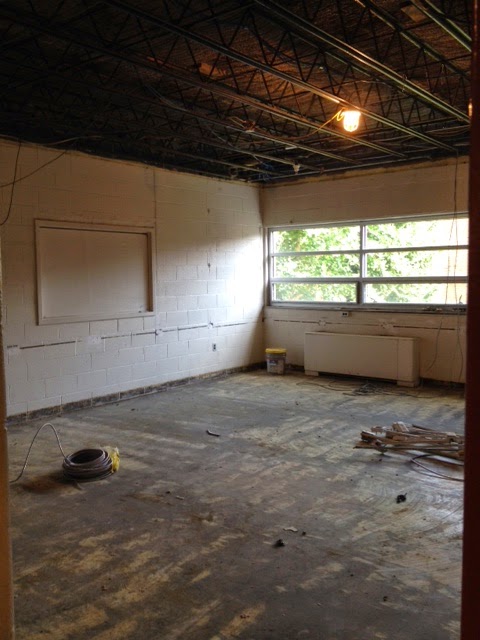
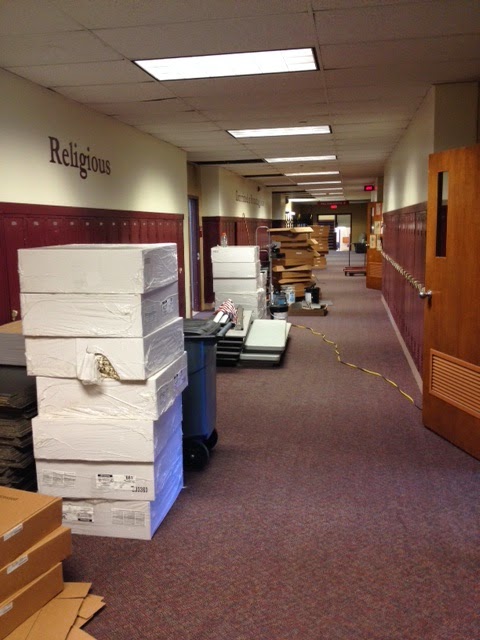
Classrooms were taken down to studs and cement.  New electrical wiring, new HDMI and ethernet, new HVAC, new ceiling grid, tiles, flooring are installed or about to be installed.  Materials are staged in the hallway for installation.  Projectors, screens, TV's and desktops will be moved with furniture in later weeks.

We are reaching the precarious stage where it looks like we are behind schedule.  We aren't... but appearances belie realities.  It's a time of frustration with the mess, weariness with the random power outages/alarms and panic that the Fall Semester is rapidly approaching and the chairs haven't been delivered.
As with all disruption... the propensity for "what if..." could out pace the vision.  Here is where faith lives.

I've written before on the symbolic and material meanings of physical space. Classrooms hold symbolic value (right or wrong) in American culture as the entry point of equality.  Education is the vehicle to success and prosperity... the classroom is portrayed as the idyllic innocence of childhood and the path to success.  And yet, just like libraries, classrooms have material functions to provide... testing, discussion, writing, lecture, viewing, reading... all those activities that are a part of "education".  I have to wonder:

  • Can learning happen without chairs? 
  • Can success occur if the paint isn't dry?  
  • Can discussion happen without a projector? 

 I would argue YES to all the above.  Physical space can influence, inspire and enhance... but ultimately relationship, human relationship, is what binds us and facilitates growth.

But this is a post about renovating classroom space!  So... living within individual symbolic and material context, our old excuses to validate stasis are becoming obsolete. Furniture doesn't have to stay in neat rows to symbolize orderly teaching.  Students can project and share from personal devices - sharing their findings from their personal location.  This shifts the material practice to student-centered activities and away from teacher-centered lecture.  Suddenly we find ourselves with limitless possibility... on the cutting edge (if not bleeding edge) of educational practice to support student learning.  Exciting and daunting at the same time because our symbolic and material expectations of school are intentionally unsteady.

It's a little messy around here.  This amount of physical disruption is going to cause some dissonance.  The work of redefining the symbolic and material understanding of the classroom is a time for relationship -  listening, dialogue and patience... and maybe some Windex and ibuprofen.  Classes begin here August 12th... Prayers are welcome.  Visitors are welcome in October or so when the paint is dry.

Saturday, February 1, 2014

This Ain't Your 1970's Snow Day

It's been a rough winter here in the MidWest. Schools are scrambling to gather their 180 days in Indiana.  But face it, an extra day (or 4) tacked on in May is not going to make up for the momentum lost in January.  But hey folks!  There are resources out there that can help keep the momentum and the learning going.... well beyond the four physical walls of the school building. Or as we like to say...communicate, collaborate, consume and curate... anytime/anywhere regardless of the weather (unless you lose power like we did in the January 7th storm then you're pretty much just reading by paper and staying warm by fire #17thcenturylearning). 

As I like to say, "This Ain't Your 1970's Snow Day..." Or at least it certainly doesn't have to be ... although pancakes, hot cocoa and sledding are still allowed (unless it's another one of those polar vortexes in which case I highly recommend this experiment from Minnesota Cold).  


Twitter #Chats

  • Simple push notifications.
Send out reminders, reading links or review questions for students.
  •  Class #hashtag
Asynchronous but easily searched. Say #BJPSEng9 if you teach freshmen. No need for your students to have a Twitter account (but most do) – hashtags are publicly accessible on public accounts. You could also make a class Twitter account (in which case it would be @BJPSEng9). 
  • Live #chat

Set up a time (say normal class time) letting students know you will be live and online. Send out prepared questions and expect answers.  Or just be there to answer student questions. Use a class hashtag for students to follow or read later.


Google Apps for Education (aka GAFE)


Had a small group activity in mind for room 218 period 3? Set up a Google Doc and have students answer questions collaboratively from home.  A shared Google Presentation allows students to view or view & edit materials easily.  If you have a presentation all ready for “live” class – throw it up to a shared class Folder and have students view outside of class.

Google Forms


Google Forms can be turned into a quiz simply by asking content specific questions.  Or they can be designed more like a handout where students answer/practice/reflect on topic areas you wanted to cover face to face.


G+ Communities

You can create a G+ Community for just your class.  This makes a group page where you can upload readings, videos, links and have students comment on them. Help pages for this feature can be found at https://support.google.com/plus/answer/2872671?hl=en


Try a HangOut


Feeling like a live chat?  Set up a Google Hangout on Air. The added benefit is this records the discussion for later viewing (say by students are not able to join the live feed). Regular Hangouts work too by clicking the New Hangout button in your G+. I have seen this used for quiz review, new material or discussion. Detailed how to’s can be found here… https://support.google.com/plus/answer/2553119?hl=en

***Student must be in your G+ Community to “hangout”


Other Resources

Edmodo

A favorite of Brebeuf Social Studies types… looks like Facebook but you must be an educator to make a page.  Students are invited in with a class password. Post videos, readings and links and begin the discussion.


YouTube


Since we are a GAFE school, every student and faculty member has an AMDG account which comes with YouTube access. (Not a GAFE school? Your regular GMail account works).  You can upload a self-created video (via Camtasia or WeVideo) or edit directly into YouTube. More details at https://support.google.com/youtube/answer/57924?hl=en

Class Blog or Website

Several of our Brebeuf faculty have created their own class pages using various free blogging tools.  Check out Edublogs, Blogger and Weebly to start. 

Go For the Free Trials

Try a streaming conference product… heck, it’s a free trial.  Check out GoToMeeting or AdobeConnect.  Winter can’t last forever, right?