Tuesday, July 10, 2012

Summer Reading: Kenneth Burke’s Permanence and Change

Part One: Trained Incapacity


In his book Permanence and Change, Kenneth Burke discusses the idea of “trained incapacity” (the origins of the term – maybe Veblen, maybe not – is not the point here for the one or two Communication scholars who may stumble upon this blog post). For Burke, trained incapacity infers training so ingrained in the learner’s orientation (context in Jesuit speak) that the learned way of doing things efficiently works against future success. In a Pavolian example utilizing chickens trained to a bell food signal and then receiving punishment for following the bell… Burke concludes, “With their past education to guide them, they would respond in a way which would defeat their own interests.” Or to use his human example, business(people) who have been so trained in one form of competitive finance that they cannot see the value in alternative strategies and refuse to change strategies even if economic environment changes (hmmmm….can’t imagine what that would be like…).


As educational technologists, we too have our trained incapacities. Our orientation of school is still students in neat rows, quietly working on the same task to become the most efficient college student/worker/voter/adult. I am dismayed at the number of advertisements from technology vendors I receive which show rows of students with the same device sitting, blind staring at the screen. I am annoyed at twelve year old Inter-Active Whiteboard technology touted as new and innovative when it is still a teacher at the front of the room making “knowledge” happen on a board. I start yelling when I read of tablets as textbook replacement – same model of read and answer the questions at the end of the chapter (with pencil) but using a device which could open the world if not locked down from gaining Internet access. School still looks like it did in 1920… only with more demands on electricity and a bit more shine. We respond to the shiny-pretty food bell as quickly as the chickens in Burke’s narrative.

Where do we block alternative practices with the phrases “It will never work” or “We tried that in the 90’s” or “The students will just go to Facebook”? Where do we block alternative practices because it is noisy, messy and not in neat rows? Being open to growth is a Jesuit goal of the Graduate at Graduation – a value we consciously strive for in all our graduates. As educators, let’s have the same openness to growth and change. Our BYOT model is an alternative strategy. In dialogue with students, teachers, parents and vendors we have challenged orientations. We have asked people to let go of past educational orientation. August 9th is a big day for Brebeuf – our first day of 1:1 BYOT. It’s frightening, challenging and exciting for me. A challenge to my 20+ years of training in education which is disorienting when all my past experience is also learning in neat, hushed rows. Neat, quiet, geo-specific rows is not the world our students will inhabit. I need to be open to alternatives to facilitate their movement into a world I cannot imagine. I challenge us all to reflect on where our training as educators and technologist incapacitates us and to be open to alternative strategies… and beware of those food-bells.

.


Saturday, June 23, 2012

Jen and JD Show: Episode 2

'Tis the season for road trips... JD is in San Diego with all you ISTE types.  And having a grand time learning about ePortfolios and making new friends from what I can tell on the Twitter feed.  I am off to Milwaukee for the JSEA (that's Jesuit Secondary Education Association) Symposium focusing on professional development.

We had a spare 20 minutes on Thursday so we filmed Episode 2 of the Jen and JD Show. I am sure actual blog posts with thoughtful written insight will be coming soon - but probably not this week.  In the meantime -Enjoy!


PS - This was a day off for me... thus the snazzy shorts and ponytail.  I was hauling my 2nd grader to science camp... don't judge.

Monday, June 11, 2012

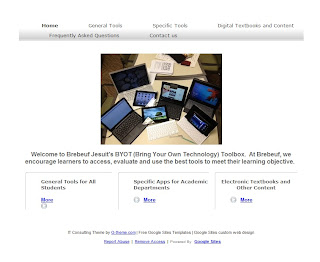
What I Did for Summer Vacation: A Google Site

Authentic learning objective: Create a webpage for Brebeuf Jesuit's 1:1 BYOT initiative with tools, FAQ's and contact information.

Tools Available: various free blogging sites, current webpage, Google sites, by hand coding in Notepad

Evaluation: I didn't have much time (or coding talent) so a template based system was appropriate.  We are a Google Apps for Education school for it made sense to try out another level of the system.

Reflection: I would say that for the entry-level, "I need a website quick" user the tool was perfect. 

This toolbox was made specifically for the Brebeuf Jesuit Preparatory School community.  That said, feel free to borrow any page or content... just give us a little citation love please.


Saturday, June 9, 2012

Yes, We Have a Show!

In much the same way as Mickey Rooney and Judy Garland would say "Let's Put on a Show" and suddenly a fully constructed proscenium arch would appear in Grandpa's barn... we thought we'd venture into video production.  Cross Posted from Confessions of a School CIO.

As JD said in original post...

So please, sit back...no, on second thought...
Read the links.
Post comments.
Retweet, share, subscribe....
Do that interactive PLN thing that you do SO well.

Episode 1: The Snarkfest o' Educational Stuff.

The Teacher Resource Center before the cameras were arranged.

Here's the Screencast/Vlog/Video Link CLICK HERE to view.
(link is because Blogger will only link to YouTube and the Camtasia embedded links works better on Screencast.com)

Friday, June 1, 2012

A BYOT Glossary for the School Community

The feedback loop is hinting that @jdferries and I are speaking a little too "techie" these days for the local school community.  And that feedback is probably correct as we hang out with tech-types and each other so much we speak in what sounds like code (and sometimes is code - but I digress)... So I am starting this BYOT Glossary for the School Community.  All Brebeuf students are expected to have a device, in hand, ready to use on the first day of school for 2012-13!  Devices pictured below have been piloted this year (by students - more than one - not just heavy tech users) and we feel confident saying they work at the school. The MBS electronic book platform has also been successfully tested on these devices (the electronic devices - not the mechanical pencil).

BYOT: Bring Your Own Device.  Refers to a computing model where the student chooses the device best suited for them... rather than an IT department dictating device.

For those new to the Bring Your Own Device discussion - I offer some key terminology you'll need to know in the glossary below.  Regular readers - feel free to add other suggestions in the Comments box below.  Eventually this will all go on the school website - but as the website is being redesigned I thought why not start here on the blog.


BYOT Glossary


The following are operating systems… basically what makes the device turn on, light up and run programs you want…These operating systems work on the Brebeuf Jesuit network.

Android – refers to operating system for mobile devices not made by Apple.  Marketplaces include Google Play, Amazon App Store for Android and Android Marketplace.

Examples
· Samsung Galaxy Tab
· Asus Transformer Prime
· Lenovo ThinkPad Tablet
· Motorola Zoom

Chromium – refers to operating system creating by Google.  Currently only runs on Chromebook sold by Samsung and Acer. Unlike traditional laptops, Chromebooks are “nothing but web”.  At startup, Google Chrome opens and all applications are run through browser based apps.  Marketplaces are Chrome Store and Google Play.

iOS – refers to the operating system for mobile Apple products.  Marketplace is iTunes.

Examples
· iPad
· iPhone
· iTouch

*** Linux – Open system which is mostly used by tech geeks because it allows for modifications and doesn’t involve all the licensing mess of Mac OS and Windows. We have not tested Linux extensively on Brebeuf network – if you are thinking of using a Linux machine please stop by IT.

Mac OS – refers to the operating system for laptops and desktops made by Apple (MacBook Pro, iMac).  Recently named after large, predator felines such as Snow Leopard, Lion, Mountain Lion. Helps run programs like Pages, Keynote, iMove, Office for Mac and the like in a traditional computer model.

Windows – refers to operating system for PC laptops and desktops.  Used by a variety of vendors including HP, Asus, Lenovo, Dell, Acer.  Helps run programs like Word, PowerPoint, Windows Live MovieMaker and the like in a traditional computer model.  Will not run most Apple programs.


Other terms you may hear:


App – short for “application”.  Apps are small, single use programs that run typically on mobile device (although apps for full Apple and Windows devices are in the works).

Browser – program that gets you on the Internet.  Popular browsers include: Chrome, Internet Explorer, Mozilla Firefox, Safari, Opera.

Cloud Storage – back in the day, when you hit File-Save, the document saved on the computer in front of you or a server in the basement of the building you worked in.  Now there is a third option generically called “The Cloud”.  Don’t be confused, the file still sits on a server in the basement… it’s just that the basement is 600 miles away.  You can access that server from anywhere, anytime as long as you have an Internet connection.

Examples
· iCloud
· Dropbox
· Google Drive via Apps for Education (Brebeuf will give student account)
· Box
· Microsoft Skydrive

eReader – Devices specifically designed for reading electronic texts.  While some eReaders may do basic web-based activities, the primary function of the device is reading.  Think of a book that can get to your email.  These do not meet Brebeuf 1:1 BYOT requirements as you cannot create documents, presentations or spreadsheets on these devices.

Examples
· Kindle devices
· Nook and Nook Color
· Sony Reader

Marketplace/Store/Walled Garden – Each mobile operating system has online store where one buys apps, music and movies.  These stores (gardens) do not share between each other (thus the wall) very easily if not at all.  For example, an iTunes app for iPhone cannot be transferred to an Android device and vice versa.  We mention this because a garden can influence preferred device – particularly if you have money invested in one garden already.

Examples
· iTunes (Apple Devices)
· Android Market (Android Devices)
· Amazon Markets (Kindle Store, Android App Market, Cloud Player)
· Google Play (for Chrome and Android apps, music, movies, books)


Saturday, May 26, 2012

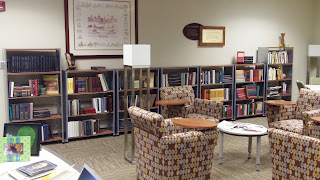
In Support of the K-12 Media Center

I’ve been wrapping up the end of year evaluation season this past week. I love conversation guided by reflection – light and shadows of the previous year. Practices that knocked it out of the park… ideas in search of a practice brainstormed. This week I met with both our librarians (yes… be jealous… Brebeuf has TWO actual librarians) ‘cause I am a cool department chair amongst other awesomeness.


While putting together resounding “meets and exceeds expectations” evaluations this week – I realized again that the scope of the 21st Century library is HUGE. Here is a couple of minutes worth of review on what a typical K-12 Librarian/Media Specialist/Teacher-Librarian is expected to do…

· Encourage reading as life-long passion

· Assist students in information access, retrieval, evaluation and use

· Collaborate, support, team teach with classroom teachers

· Maintain, purchase and use technologies such as personal computing devices, e-Readers, video cameras, wireless networks and copy machines

· Maintain a physical collection of print resources reflective of multiple perspectives, reading levels and school mission

· Understand architectural theory of space use and design

· Understand adolescent development

· Develop, submit and manage budgets and grant proposals that support 21st Century Learning

· Develop, submit and manage a definition of what the heck 21st Century Learning means

· Create websites, signage, bulletin boards and displays that promote all the above

· Know every trending vampire, werewolf, post-apocalyptic, dystopian series by heart AND yet engage in intimate dialogue regarding the merits of Keats vs. Thoreau’s images of nature (and where to find the definitive concordance of both).

· Oh… and run a library automation system (yes, that might include checking out books) that rivals anything the NASA has

(This is not exhaustive… I left out all the stories of when, as a pre-K-6 Media Specialist, I had to deal with bodily fluids.)

In light of all this… and in light of all the information literacy discussions held every minute in educational circles, I am disheartened to watch neighboring school districts eliminate their Media Specialists positions. One large, urban district in these parts is zoning the elementary schools – 1 Media Specialist per zone with the total number of zones being 5. There are roughly 35 non-magnet elementary schools to that’s one specialist per 7 schools:

7 schools X 400 students per school = about a 1:2800 specialist: student ratio… add in teachers in the building and heaven help us parents and the number is probably more like 1:4000.

I hypothesis that while some books may get checked out and stories read, there is no access, evaluation, use discussions taking place or technology rich learning happening in this structure. Brebeuf has roughly a 1:400 ratio.  Compare that to 1:2800... wonder how we perpetuate the Digital Divide?  Cutting Media Specialists in public schools is an excellent way.

In 2011, the AASL (American Association of School Libraries) division of ALA surveyed Urban Media Specialists (full report) finding these individuals serve populations with high poverty and English language learners as well as high dropout rates. Students had low access to technology in the home and little support in how to effectively use technology to support their learning. The study also found that the Media Specialist was often the only adult in the building who worked with students across grade levels and curriculum. Only 37% of those surveyed had a full-time Media Specialist in the building. Yet, the schools were under pressure to ensure “college readiness” and career skills. Read the study, it will break your heart.

So where are students learning the skills we claim they need to know to be productive, 21st century citizens? Where are they learning how to access, evaluate and use information in the tidal wave of data found on the Internet? Where do we create spaces of equitable access to digital tools and resources? I can tell you as information literacy is not tested in Indiana standardized tests and in light of new pay-for-results salary schedule these skills are not being taught in the classroom. (I don’t fault classroom teachers, they have enough to cover). And trust me, children do not magically show up in kindergarten knowing how to conduct a productive online search, evaluating results to support their research question. Direct contact, direct support… if we truly believe every child deserves a college-ready education then we’d better support Media Centers in our public schools.


(And for those of you out there who say the book is dead and therefore the library is dead… when was the last time you were in a library? Even Alexandria had more than just scrolls…)


Tuesday, May 22, 2012

Ed Tech Lingo Bingo 2012

Some of you might be aware of a little game @jdferries and I made up last year after sitting in way too many webinars entitled "Ed Lingo Bingo".  Now, after sitting in on way too many #chats, we bring you Ed Tech Lingo Bingo.  Curl up with your favorite device, login to a #chat and play along!

We are encouraging one of our students to create an app for the game over the summer.  Hopefully, more to info on that front soon...

Ed Tech Lingo Bingo by @40ishoracle and @jdferries